• Feed RSS

Pages

Showing posts with label google. Show all posts
0
What is google Buzz? You might have several questions in your mind regarding Google Buzz as Google released this new product suddenly without much hype. Well, if you need an answer in just one line to the earlier question, then Google Buzz is Google’s approach to sharing where Google utilized the common features of Facebook and Twitter and applied it’s largest search and location expertise. Once it gets integrated with Gmail, other social media websites like Twitter and Facebook will face a pretty strong competition.
Google will allow users to integrate goolge buzz with gmail. After successful integration, it will start showing up in user accounts as a new tab pop up under their inbox. This will bring a revolution in social network
since users can automatically gets connected to someone on Google Buzz if they had earlier email or Gtalk conversations.
Google Buzz
Google Buzz
Google Buzz users can share links, photos, videos, and update their status. You can also comment on and “like” friends’ postings just as on Facebook, and send @ messages to get specific users’ attention like you do on Twitter.
Mr. Jackson, product manager of Google Buzz mentioned top five key features of Google Buzz :
  1. Auto-following
  2. Rich, fast sharing experience
  3. Public and private sharing
  4. Gmail inbox integration
  5. Just the good stuff

src-solidblogger.com
    0
    Now you can watch bollywood movies in youtube just go here http://www.youtube.com/movies?b=18.
    the movies are free to watch.so enjoy!!
    0
    I am sure a many of you have Gmail accounts and if you frequent internet a lot you might have two or even Gmail accounts. Sometimes for a backup, sometimes to keep work and personal related emails separate majority of us might have two Gmail accounts. For instance I have two accounts, one was a personal one, the other I use for testing purposes, like I used it during this post. :-)
    If you have two Gmail accounts and need to use them often it can be a bit of a bother considering when you sign-in with one account you cannot sign into the another account on the same browser.
    Recently I used another method by using a Firefox add on for using two Gmail accounts at the same time. For using this add-on you need to have Greasemonkey installed on your Firefox browser. If you are using Windows with Firefox you can install Greasemonkey from here.

    Google Account Multiple Login

    • Gmail Multi User Login works only after you have installed Greasemonkey.
    • Download the add-on by clicking here.
    • The add-on is installed and you can use Gmail multi user login. ;-)
    • Once this add-on is installed on Firefox it replaces the Sign-Out link to the right hand top corner of your Gmail account with a drop which allows you to log into another Gmail account.
    src-devilworkshop.org
    0

    Bollywood film-maker Vinod Chopra has announced that their latest film, Three Idiots, will soon be available for download on the YouTube website.
    YouTube Movie Screen
    Google Enters Pay-Per-Download Business
    You could always download videos from YouTube using "hacks" but this is probably the first time where people will be able to "legally" download a full-length movie from YouTube after paying Google a certain fee.
    The film producers won’t say how much a viewer would have to shell out in order to download the movie from YouTube, the size of downloads (this can be a major deterrent in India considering our average connection speeds ) and whether there would be any other restrictions attached.
    In any case, if this "pay-per-download" experiment proves successful, we can surely expect more such "online releases" in the future because it will become much easier for producers to tap a global audience. The Hindu and ET have more details on this story.
    The 3 Idiots movie is already running in theatres across India with some innovative marketing but its YouTube debut will happen only after 12 weeks so as not to affect the ongoing ticket sales. Here’s an HD Trailer of the same movie on, you guessed it right, YouTube!


    If you are a fan of Google products (I must say its getting increasingly hard to come across someone who is not) you might be using Google related software on your computer. As I am about to buy a new computer, I was looking up what is new that Google has to offer. Google Pack is a nice one stop shop to download various Google related software you might want to download in one go.
    Google Pack

    About Google Pack

    • Visit the Google Pack page, and look up which Google affiliated software is missing on your computer.
    • You can check which one you want installed and start downloading.
    • Google Pack includes Chrome browser, google earth, Google Talk, Google Apps,google desktop, Picassa, Real Player, Adobe Reader, Google Toolbar for Firefox and Internet Explorer and skype.
    • All these software applications can be downloaded from just once installation if you are using a Windows OS.
    • If you are using a MAC, you might want to check out their Mac page which also is a one stop page to download various mac related Google applications.
    0


    Google SMS channels are the new trend in India.Google SMS Channels is a service that enables channels/groups on SMS. It's a free service that enables you to get premium content published by Google publishing partners, Google popular products (Google News, Blogger and Google Groups) and websites with RSS/Atom support for free. SMS Channels allows you to create your own channel(s) to publish content that other users can subscribe to. You can also create groups over SMS to communicate with your friends, family, and co-workers. Before the arrival of Google SMS Channel, we have to pay money for mobile service providers to subscribe cricket alerts or News alerts in mobilephone.Get free cricket score on mobile phone. Now there are plenty of Google SMS channels which offer latest information of any subject that you can subscribe.Get free News updates on your mobile phone via sms. These Google SMS Channels are free of cost and easy to subscribe on your mobilephone by online or SMS.

    How to control Google SMS channel ?
    You can specify the maximum number of messages along with the time interval when you wish to receive them in a day. To specify these on the website, click the Settings link.

    To do so using your phone, SMS '"PREF "' to 9870807070.

    to be specified in hh:mm:am(or pm)format.

    For example, to limit the number of messages to 5 per day and to only receive them between 10:00am and 6:00pm , send the following SMS to 9870807070:

    PREF 5 10:00:am 6:00:pm

    If the number of messages posted across your subscribed channels exceeds the maximum limit, you'll receive an alert along with instructions to retrieve the extra messages, if you'd like.

    How do I unsubscribe from a channel?

    To unsubscribe from a channel, go to the My Channels tab on the web front end. For the channel you'd like to unsubscribe from, simply click the 'Unsubscribe' button.

    To unsubscribe using your phone, SMS 'OFF ', to 9870807070 whereis the name of the channel.

    For example, send the following SMS to 9870807070 to unsubscribe from GoogleNews channel: OFF GoogleNews

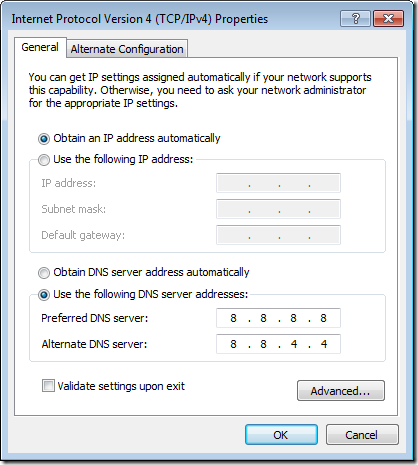
    Google has recently introduced Google Public DNS Service which provides faster and safer browsing by using the Google Public DNS Servers rather than your slow ISP DNS servers. However changing the DNS servers of your network adapter is quite tedious job as you will need to type in the DNS Servers of Google [ 8.8.8.8 and 8.8.4.4 ] you cannot simply copy and paste them in the boxes. [ as shown in the image below ]
    google-dns-servers

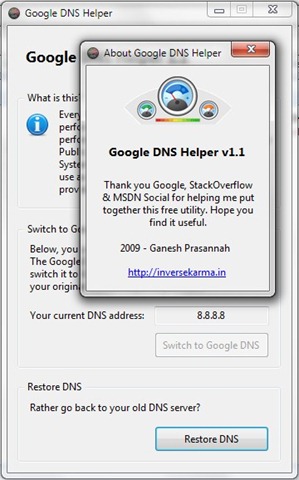
    On the other hand Google DNS Helper is a small utility coded in .NET using C#. It backs up your current DNS server address and then changes it to Google’s DNS. You can restore your old DNS anytime you want just by a simple button click.
    google-public-dns-helper


    The above application interface is really simple, you don’t need to configure anything just click the button Switch to Google DNS to apply google dns servers and to revert back to old dns servers click the button Restore DNS.
    Note: This application requires .NET Framework 2.0 or higher to be installed on your computer.


    Read more: http://www.technixupdate.com/quickly-switch-to-google-public-dns-servers-or-restore-to-old-default-dns-servers-with-google-dns-helper/?utm_source=feedburner&utm_medium=email&utm_campaign=Feed%3A+TechnixUpdate+%28Technix+Update%29&utm_content=Gmail#ixzz0aHH5MCUW
    GOOGLE HAS LAUNCHED ITS ALL NEW URL SHORTENING SERVICE http://www.goo.gl/ BUT IT'S AVAILABLE ONLY WITH GOOGLE PRODUCTS AND NOT LIKE OTHER SERVICES LIKE 3.LY OR TINYURL.COM.

    BUT I FOUND A GOOGLE CHROME EXTENSION WHICH ALLOWS TO CREATE GOO.GL SHORT URL'S FOR THE PAGE YOU ARE VIEWING INSIDE GOOGLE CHROME WITHOUT GOOGLE TOOLBAR.
    THE LINK FOR GOOGLE CHROME EXTENSION IS- WWW.3.LY/5dix
    IF YOU ARE NOT USING GOOGLE CHROME AND USING OTHER BROWSERS LIKE INTERNET EXPLORER OR FIREFOX THEN YOU CAN USE IT BY GOING TO THIS LINK- WWW.3.LY/CTe
    REMEMBER THE SERVICE NOT PROVIDED BY GOOGLE.